Tuesday, June 13, 2017

PosgreSQL on Windows: could not find a "psql" to execute

I installed PostgreSQL 9.6.3 on a Windows host. After I had run batch file pg_env.bat on the host, I encountered the following error message when I ran psql

could not find a "psql" to execute
psql: could not find own program executable

It turns out that the quotation marks for path of the PostgreSQL binary from the batch file pg_env.bat is the culprit. For instance, the pg_env.bat batch file on my Windows host has the following content,

@ECHO OFF
REM The script sets environment variables helpful for PostgreSQL

@SET PATH="C:\Program Files\PostgreSQL\9.6\bin";%PATH%
@SET PGDATA=L:\stackoverflow\Data
@SET PGDATABASE=postgres
@SET PGUSER=postgres
@SET PGPORT=5432
@SET PGLOCALEDIR=C:\Program Files\PostgreSQL\9.6\share\locale

To correct the problem, we need to remove the quotation marks from the "SET PATH" line, i.e., to change the file to the following,

@ECHO OFF
REM The script sets environment variables helpful for PostgreSQL

@SET PATH=C:\Program Files\PostgreSQL\9.6\bin;%PATH%
@SET PGDATA=L:\stackoverflow\Data
@SET PGDATABASE=postgres
@SET PGUSER=postgres
@SET PGPORT=5432
@SET PGLOCALEDIR=C:\Program Files\PostgreSQL\9.6\share\locale

Sunday, May 7, 2017

Mounting Logical Volume Management (LVM) Volumes

I have two hard drives from an old Linux machine. These hard drives were under one Logical Volume Management volume. On another Linux host, I found these tools were very useful to get the data out.

  • Scan LVM volumes

    sudo lvscan

  • Activate LVM volumes

    modprobe dm-mod
    vgchange -ay

  • List and remove mapped LVM devices

    dmsetup ls
    dmsetup remove <device>

    where an example of "device" can be VolGroup00-LogVol01

Troubleshooting

When you see an error message like the following when you try to mount a volume,


# mount /dev/VolGroup00/LogVol00 mnt/
  mount: /dev/mapper/VolGroup00-LogVol00 is write-protected, mounting read-only
  mount: /dev/mapper/VolGroup00-LogVol00: can't read superblock

One solution that has worked for me many times is to remove the mapped LVM devices using the command we discussed in the above. For instance,

# dmsetup remove VolGroup00-LogVol00

If you perform a lvscan, you will find that the volume is inactive,

# lvscan
  inactive          '/dev/VolGroup00/LogVol00' [459.53 GiB] inherit

To activate the volume, we can run the following

vgchange -ay

Now you shall see that the volume is active,

# lvscan
  ACTIVE            '/dev/VolGroup00/LogVol00' [459.53 GiB] inherit

We can now mount the volume,

# mount /dev/VolGroup00/LogVol00 mnt/


Thursday, May 4, 2017

Windows Explorer Appears to Get Stuck at Canceling Copying Files

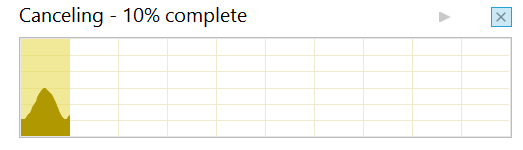
When I tried to cancel copying a large set of files at a Windows 10 system, it appears that Windows got stuck at canceling it forever. Below I saw,

which shows this "Canceling - 10% complete" indicator forever even after I closed the window. When I tried to copy a different file, this indicator stayed. This is actually not that the Windows tried to cancel copying forever. It is instead that Windows Explorer somehow kept some internal canceling state.

At present, the solution to address this are a few. The following two appear to work.
  • Reboot the system. This is a heavy-handed solution.
  • Terminate the Windows Explorer process, and restart the Windows Explorer process.

Monday, May 1, 2017

Finding Encrypted Files or Folders on Windows NTFS Partitions

Windows NTFS supports Windows Encrypting File System (EFS),which means some files or folders can be encrypted. In more than one occasion, I have lost access to files or folders while I copied them to external hard drives. Perhaps, one strategy is to list files or folders that are encrypted, and we can then decide what to do with them. This can be easily achieved on Windows Command Prompt via the following command,

cipher /S:D:\ /H | findstr "^E"

In the above example, we are looking for encrypted files on drive D:\. Command cipher lists all files and folders, and indicates whether the files or the folders are encrypted. The switch /H is to instruct cipher to look for hidden or system files as well. Command findstr allows us to use Regular Expression, and In "^E", "^" indicates the beginning of a line and "E" indicates that the file or the folder is encrypted.

Resetting Windows NTFS Ownership and Permission to Default

I moved an external hard drive from from one computer to another, and discovered that I could not access to any of the folders. The file system is NTFS. As suggested by this post, I completed the following steps to set all folders to the Windows default from Windows Command Prompt as an Administrator, and regained access to the files.

takeown /F D: /R /D
icacls "_Files" /reset /T 

The first command above is to take the ownership. The noticeable effect of the second command is to assign full access to everyone.

Tuesday, April 18, 2017

Heavy Disk Activity after Suspending a VMWare Virtual Machine Instance

I observed heavy disk activity when I suspended a VMware virtual machine instance. The VMware software is VMware Player 7.1.4 and the virtual machine instance is a Windows XP instance. The disk activity is so heavy that it almost renders the host machine non-responsive for a quite while. After some research online, I found these configuration options to be helpful,

mainMem.useNamedFile = "false"
mainMem.writeZeroes = "true"


You can apply these two configuration options in two different manners.
  • Apply them to a specific virtual machine instance by adding these two lines to the virtual machine configuration file, i.e., a .vmx file.
  • Apply them as the global and default options for all virtual machine instances by adding these two lines to VMware software's configuration file. For VMWare Player, it is %PROGRAMDATA%\VMWare\VMware Player\config.ini. If the file does not exist, you should create it. For other versions of VMware software, see this VMware KnowledgeBase article.

To understand why and how these may address the heavy disk activity issue and whether you should use these options, the following are a few excellent references that I came across in my research.
  1. VMware Workstation and Very High VMEM Fragmentation
  2. Maximize VMWare images performance
  3. Write Activity to .vmem file even though the VM is suspended
  4. Why does my PC slow down to a crawl when VMware Player is suspending to .vmem file?

Wednesday, March 29, 2017

Python script runs fine, but PyDev in Eclipse complains "Undefined variable from import"

Time and time again, PvDev in Eclipse complains "Undefined variable from import" when you tries to instantiate or import a class that you know exists.

An example is the multiprocessing.Process, and another pymc.Binomial. What may puzzle you is that the Python script runs fine in Eclipse or on Terminal. The problem is the result that some classes are dynamically generated at runtime.

PyDev actually has a solution to address this issue as discussed in its FAQ. The solution is via "Forced buildin libs" as discussed in its manual.

To add the multiprocessing and pymc package as buildin libraries, we do the following.

  1. Go to: window > preferences > PyDev > Interpreter - (Python/Jython/IronPython).
  2. Choose the interpreter you have installed in your computer.
  3. Select "Forced Buildins".
  4. Choose "New", add "multiprocessing", and confirm it.
  5. Choose "New" again, add "pymc", and confirm it. 

Note that you may have to restart Eclipse to see the effect.